WORDPRESS PLUGIN · GRAVITY FORMS ADD-ON

New cycle. Clean Slate.

Auto Archive for Gravity Forms sweeps last cycle's submissions out of the way - on the schedule you choose - so your team only sees the entries that matter right now. Built for programs that run on a calendar.

The annual-program problem

Last cycle's entries shouldn't clutter this cycle's work.

University programs, camps, grants, awards, and conferences accumulate thousands of submissions a year — and most stop being useful the moment a new cycle begins. Deleting them is risky, and scrolling past them forever is worse.

Auto Archive hides last cycle’s entries behind a dedicated Archived view so your active list stays clean, while every archived entry is preserved and one click from restored. When you’re ready to truly clear space, Pro can back up to CSV and the cloud first, then trash or permanently delete — your call, with a safety net.

Archived Entries

What's Included

A complete archiving toolkit - free

Everything below works in the free plugin. The two badged cards are a taste of what Pro automates - more on that further down.

Soft Archive & Restore

Hide entries from the default view while keeping them safe in the database. Restore any entry – or a whole batch – with one click. Archiving never deletes anything.

Dedicated Archived View

An “Archived” tab right in the Gravity Forms entries list. Browse, search, and restore – without cluttering your active entries.

Per-Entry & Bulk Restore

Archive a single submission from its row, or pull a whole cycle back out of the archive at once. Nothing is ever locked away.

Automatic Age Rule

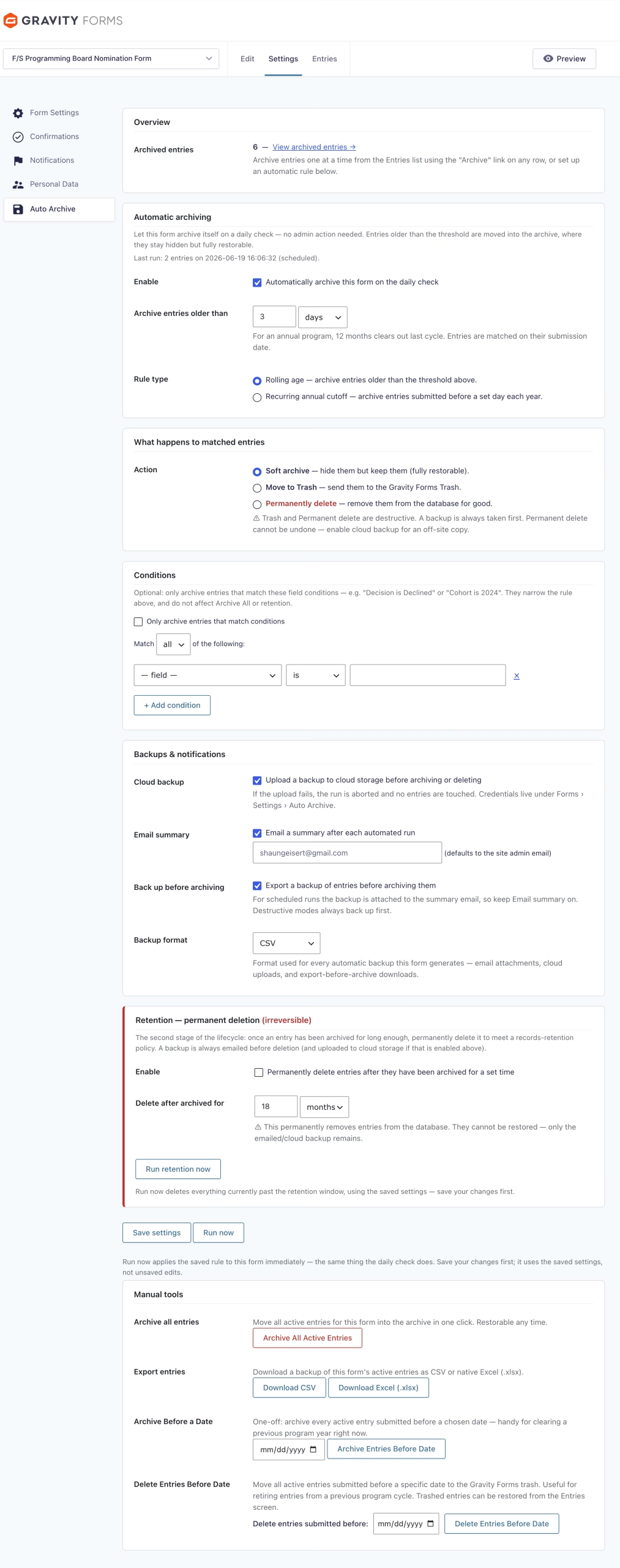
Have one form archive itself on a daily check – “archive entries older than N days or months.” A Run now button lets you apply the rule on demand, and an activity log records every change.

Accurate Entry Counts

Archived entries are subtracted from your All, Unread, and Starred counts, so the numbers in your entries list always reflect reality.

Your Data Stays Yours

No phone-home, no third-party tracking. Built on Gravity Forms’ own entry meta, so it’s compatible across GF versions and won’t fight your existing forms or add-ons.

Annual & Date-Cutoff Rules Pro

Archive everything submitted before a recurring annual date – eg, September 1 every year, or per-term cutoffs for a multi-term program. A taste of Pro’s automation.

Cloud Backup Before Delete Pro

Pro can push a CSV to Amazon S3 or Backblaze B2 before anything is removed – and abort the run if the upload fails. Safety, built in.

Setup

Up and running in minutes

Find it under Forms › your form › Settings › Auto Archive once Gravity Forms is active.

1

Install & Activate

Install Auto Archive from WordPress.org. Gravity Forms must be active – the plugin checks on activation and tells you if it isn’t.

2

Choose Your Rule

Choose Your Rule Pick an age threshold (free) or a recurring annual/date cutoff (Pro). Decide whether to archive, trash, or delete – and, with Pro, turn on CSV and cloud backups.

3

Let It Run

A daily check applies your rule automatically. Hit Run now anytime to test it on demand. With Pro, get an email summary with the backup attached after every run.

Go Pro

Built for programs that run on a calendar

Free keeps your entries tidy and automates one form by age. Pro is about the outcome institutions actually want: last cycle gone across every form, this cycle clean, and nothing ever lost in the process.

Clear last cycle the day it ends Pro

Set a recurring cutoff – say September 1, or spring/summer/fall dates for a multi-term program – and the prior cycle archives itself automatically, on every form. You’ll never scroll past stale entries again.

Never delete without a safety net Pro

Before a single entry is touched, Pro writes a CSV backup to your own S3 or Backblaze bucket. If that upload fails, the whole run stops — so a backup is never optional and never silent.

Reclaim real space when you need it Pro

Soft archiving keeps entries in the database. When you actually need the space back, Pro moves entries to the trash or permanently deletes them on a retention schedule – always after the backup succeeds, never before.

Test Before You Trust Pro

Hit Run now to fire your rule on demand and watch the whole pipeline run. An activity log and optional summary emails keep a record of every archive after that.

Off-Site Cloud Backup PRO

S3 / Backblaze B2 backups written before anything destructive. Abort-on-failure means you never delete without a copy.

CSV & Excel Attachments PRO

Export the full period's entries as a CSV or native Excel (.xlsx) file - on demand, or automatically before any destructive run. The complete dataset, ready to sort, filter, or import.

Priority Support PRO

Get fast, direct help from the developer. Pro licenses come with priority email support, so setup questions and edge cases don't sit in a queue.

Free & Pro

Start free. Scale with Pro.

free plugin is fully functional on its own. Pro is for institutions and agencies that run many forms and need automated, safe retention.

Free

Auto Archive for Gravity Forms

Manual archiving plus one-form automation, fully functional

Pro Start with a 14-day free trial, no credit card required

Auto Archive for Gravity Forms Pro

For institutions, agencies, and multi-form sites

20% OFF WITH COUPON TAKE20

$49.99
$39.99

$89.99
$71.99

$149.99
$119.99

FAQ

Common questions

Yes – Auto Archive reads and updates entries through the Gravity Forms API, so Gravity Forms must be installed and active. If Gravity Forms is inactive, the plugin’s settings remain available so your configuration is never lost.

No. Archiving flags entries and hides them from the default view. They stay in the database and can be restored at any time from the Archived tab. Only Pro’s optional trash/permanent-delete actions remove data — and those always export a backup first.

Yes – every Pro feature is free to try for 14 days, no credit card required. Use the Run now button during your trial to watch the full pipeline (archive → export → cloud backup → summary email) run in seconds instead of waiting for a scheduled cutoff. If you cancel, you simply drop back to the fully-functional free version.

Open a form and go to Settings › Auto Archive to set its rule. The global activity log lives under Forms › Settings › Auto Archive. Per-entry archive and restore links appear right in each form’s Entries list.

A daily check runs via WP-Cron in your site’s own timezone and applies your rule. Note that WP-Cron fires on site traffic — very low-traffic sites, or sites that have disabled the native WordPress cron, may benefit from a real server cron job to guarantee timing. You can always trigger a run immediately with Run now.

Yes. Run now fires your rule on demand so you can confirm exactly what gets archived (and, in Pro, that your backup and export succeed) before relying on the daily schedule.

Always, for archived entries – restore any single entry from its row, or pull a whole cycle back at once. Entries that Pro trashes or permanently deletes follow WordPress’s normal trash/deletion behavior, which is why Pro writes a CSV backup to your own storage before any destructive run.

Archive (free) hides entries but keeps them in the database — fully reversible. Trash (Pro) moves them to Gravity Forms’ trash. Permanent delete (Pro) removes them for good to reclaim space. Both Pro actions export and back up first.

Free archives any form manually and automates one form’s age rule. Unlimited forms, annual/date cutoffs, and retention-based deletion with backups are part of the Pro upgrade.

Daily runs depend on WP-Cron firing (see above). Summary emails (Pro) are sent through your site’s standard wp_mail() setup — if other WordPress emails aren’t being delivered, a transactional email or SMTP plugin such as WP Mail SMTP usually resolves it. The plugin logs problems to your PHP error log.

Ready to clear last cycle?

Auto Archive for Gravity Forms is free to download from WordPress.org. Install it in minutes - no configuration headaches required.

Contact Us Today

Name(Required)