WORDPRESS PLUGIN · GRAVITY FORMS ADD-ON

Fair Judging.
built into Gravity Forms.

Entry Judging turns a form you already have into a blind, panel-based scoring workflow — anonymous entries, per-judge scores, and results that stay sealed until every judge is done. No spreadsheets. No per-submission SaaS fees. No new platform for your judges to learn.

100% free core No account or license key Your data never leaves your site

Why a panel will trust it

Blind by default. Sealed until it's fair to reveal.

When judges can see each other’s scores, the first rating anchors the room. Entry Judging removes that problem at the source: Name and Email fields are hidden from judges automatically, each judge scores every entry on their own, and no one – not even an admin peeking early – sees a ranking until the whole panel has finished.


What's Included — Free

Everything you need to run a fair judging round

Fully functional on its own. No trial, no locked features, no license key. Install it, point it at a form, and your panel can start scoring today.

Blind Review

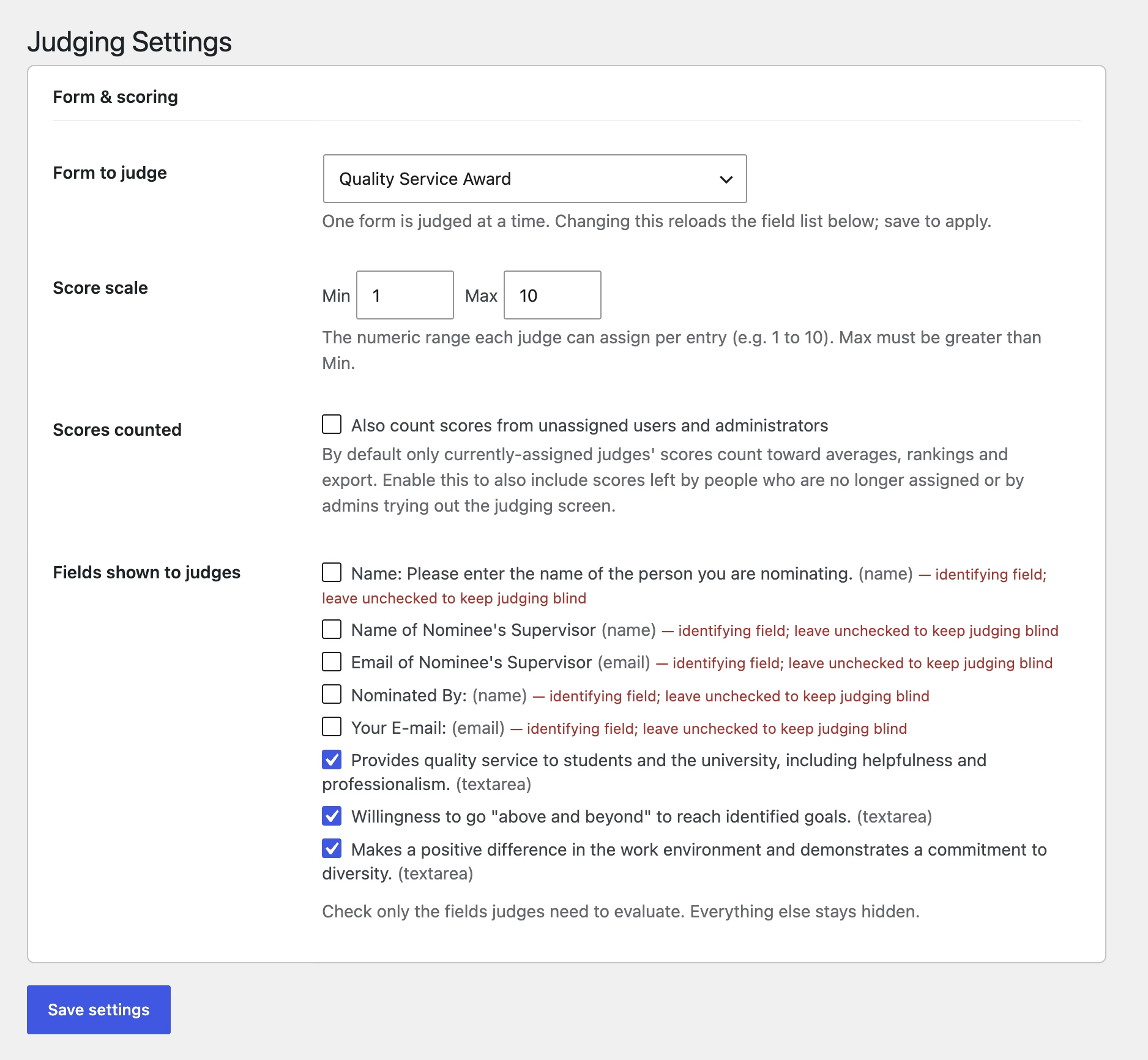
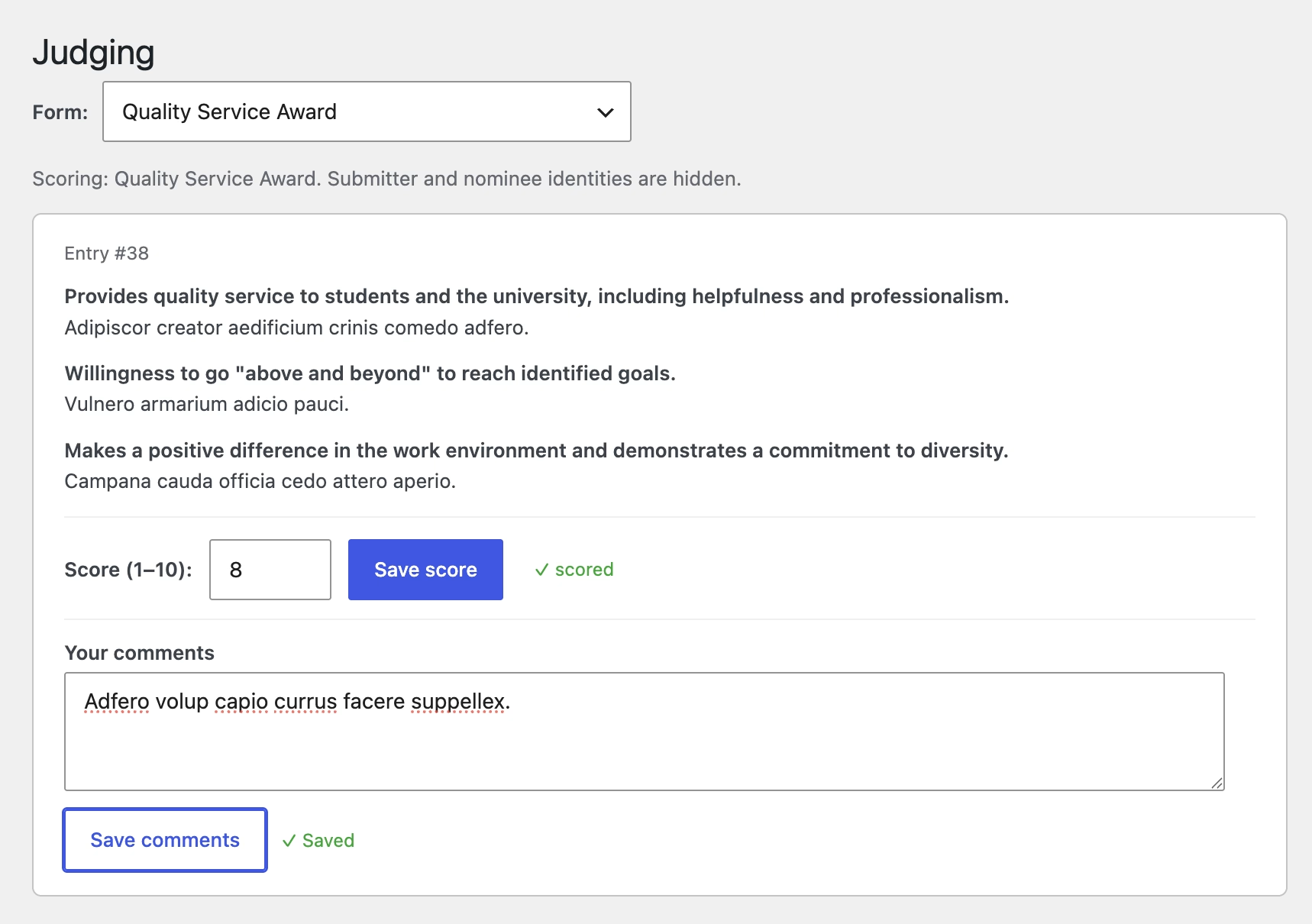
Name and Email hidden from judges by default. You choose exactly which remaining fields judges see — the work gets evaluated, not the applicant.

Reveal Lock

Results stay hidden until every assigned judge has scored every entry. No early peeks, no partial data quietly skewing the outcome. Fair by construction.

Per-Judge Scoring

Each judge saves their own numeric score per entry — scores never overwrite one another. Everything autosaves as it's typed, so nothing is lost if a judge steps away.

Configurable Score Scale

Set the minimum and maximum of your numeric scale — 1–5, 1–10, 0–100, whatever your rubric calls for. The scale is shown to judges right beside the input.

Judge Roles Without Admin Access

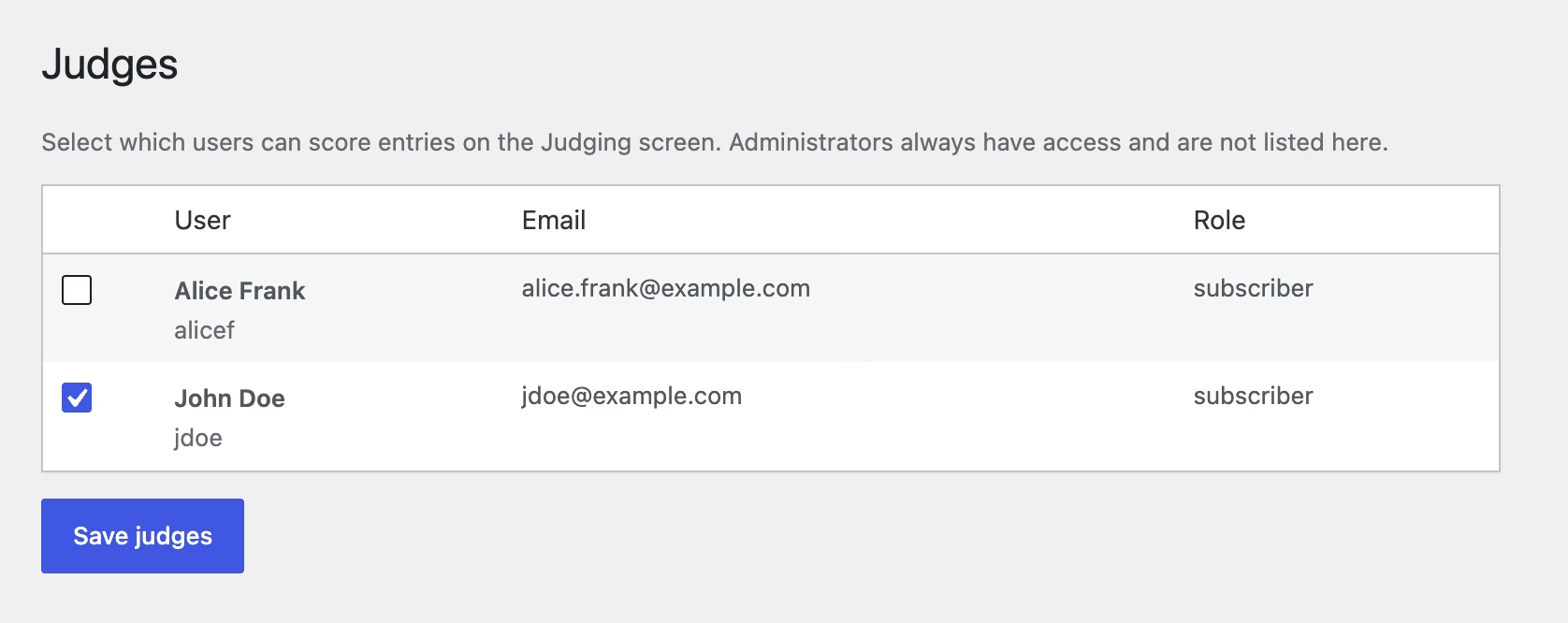
Designate any WordPress user as a judge. They get the Judging screen and nothing else — no dashboard keys, no settings, no risk. Administrators always have access.

Field Selection

A long application form doesn't mean a cluttered judging screen. Pick the exact fields judges see, so they focus only on what needs evaluating.

Ranked Results

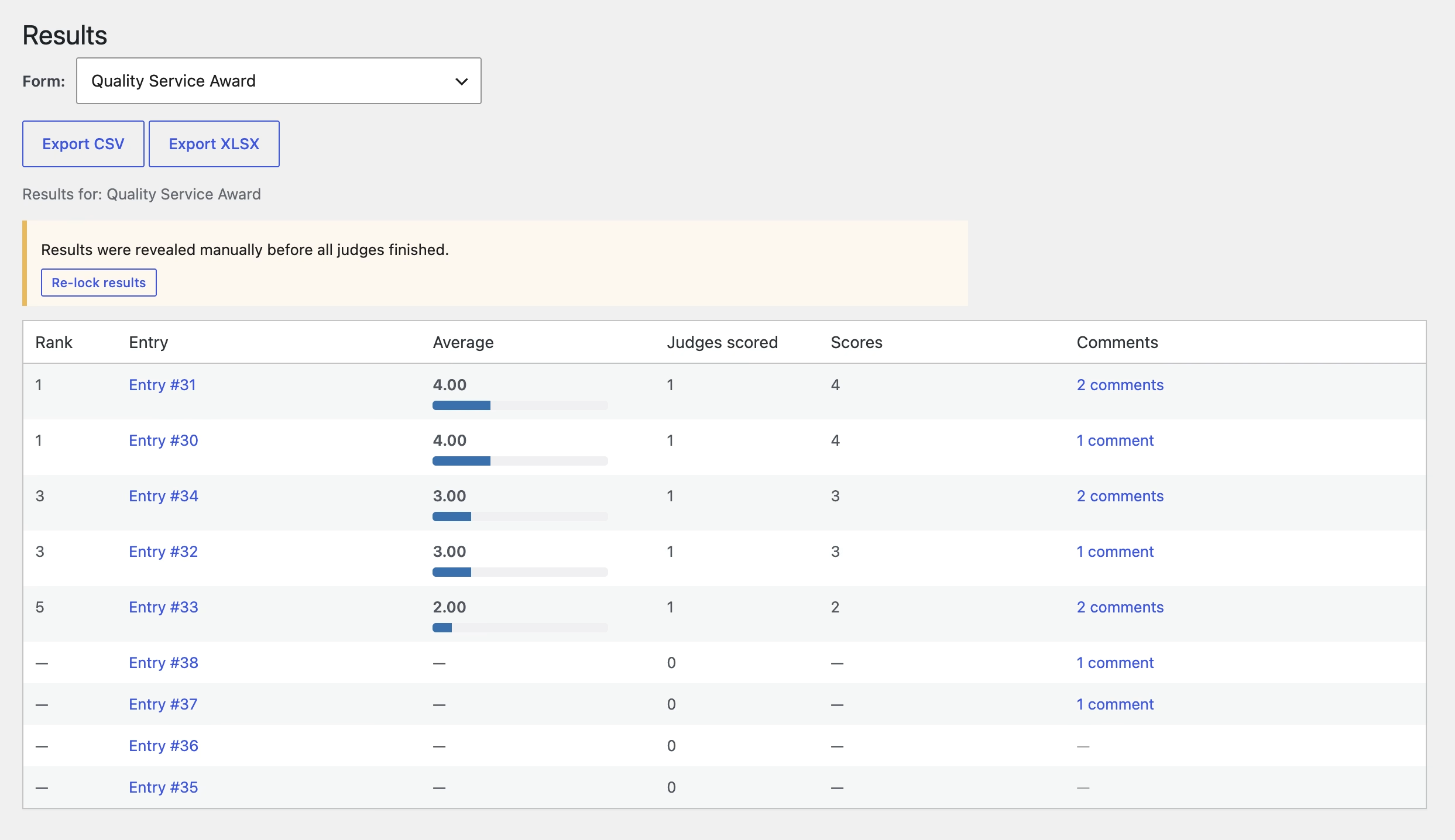
When judging closes, entries are ranked by average score, with a per-judge breakdown so you can see how each entry earned its place.

Completion Tracking

A live tracker shows which judges are finished and which still have entries pending — no follow-up emails asking "did you get to entry #47 yet?"

Admin Override

A judge dropped out mid-round? Force-reveal the results early — and re-lock them just as easily if that judge comes back. You're never stuck.

Form Picker

Choose which Gravity Forms form is being judged. Works with entries you've already collected — no re-collecting submissions, no data migration.

Setup

Up and running before your submission deadline

Find everything under the Judging menu in your WordPress admin once Gravity Forms is active.

1

Choose the Form & Fields

Go to Judging → Settings, pick the form to judge, set your score scale, and choose which fields judges see. Name and Email are already hidden for you.

2

Designate Your Judges

Under Judging → Judges, mark which WordPress users can score. Each gets access to the Judging screen only — no admin rights handed out.

3

Judge, Then Reveal

Judges score entries — anonymized, autosaved, one score per entry. The moment the last judge finishes, Judging → Results unlocks a ranked leaderboard with a per-judge breakdown.

Go Pro

Running something bigger? Pro adds rubrics, feedback, reminders, and exports.

The free plugin runs a complete judging round on its own. Pro is for larger contests, multi-form programs, and panels that need written feedback, weighted criteria, and data they can take with them.

Weighted Rubric Builder PRO

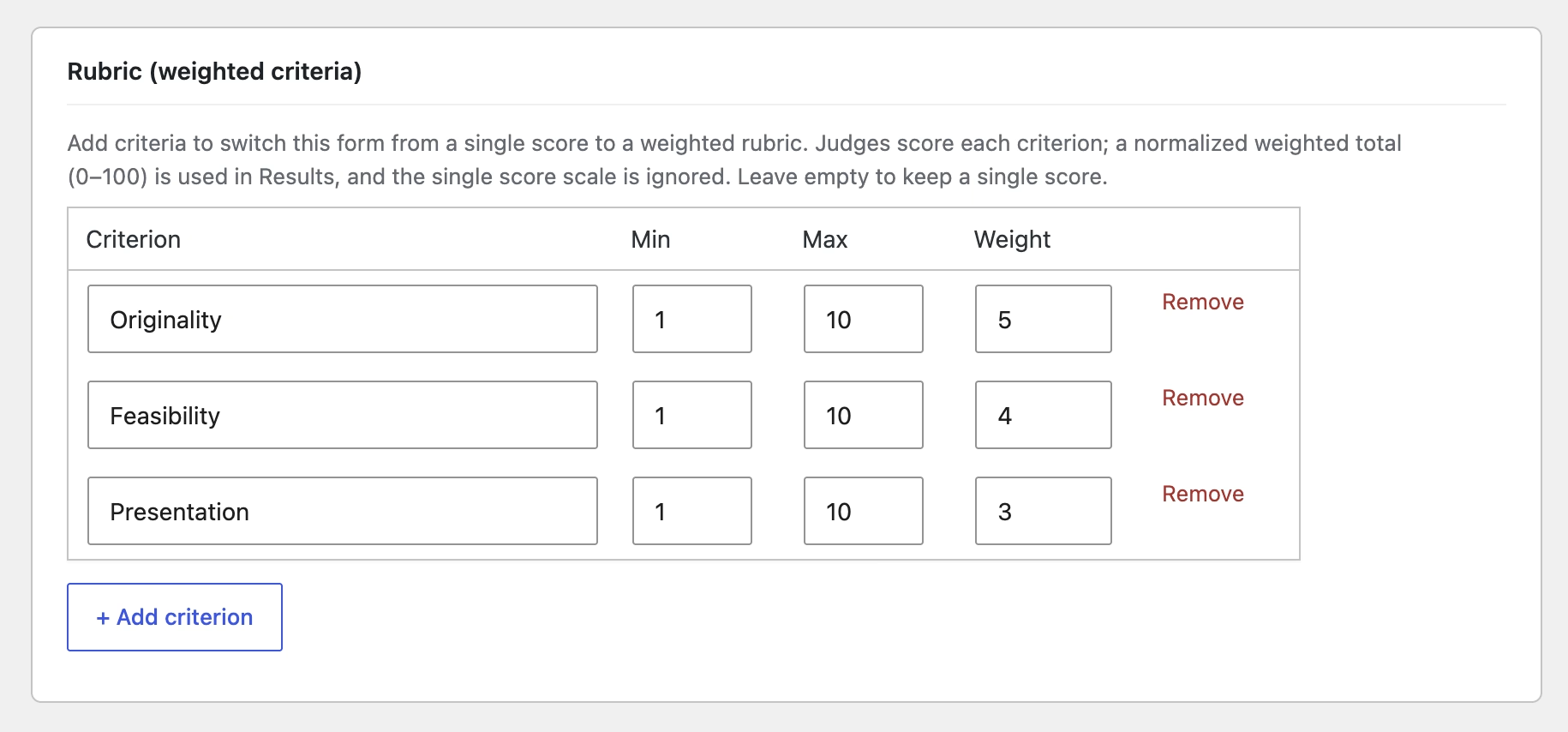
Define multiple criteria per form — each with its own scale and weight. A normalized weighted total (0–100) feeds the same ranking and reveal-lock you already trust.

Qualitative Feedback PRO

Judges leave a written comment per entry. Admins review them on a dedicated Feedback page and inline in a Comments column on Results.

Automated Reminders PRO

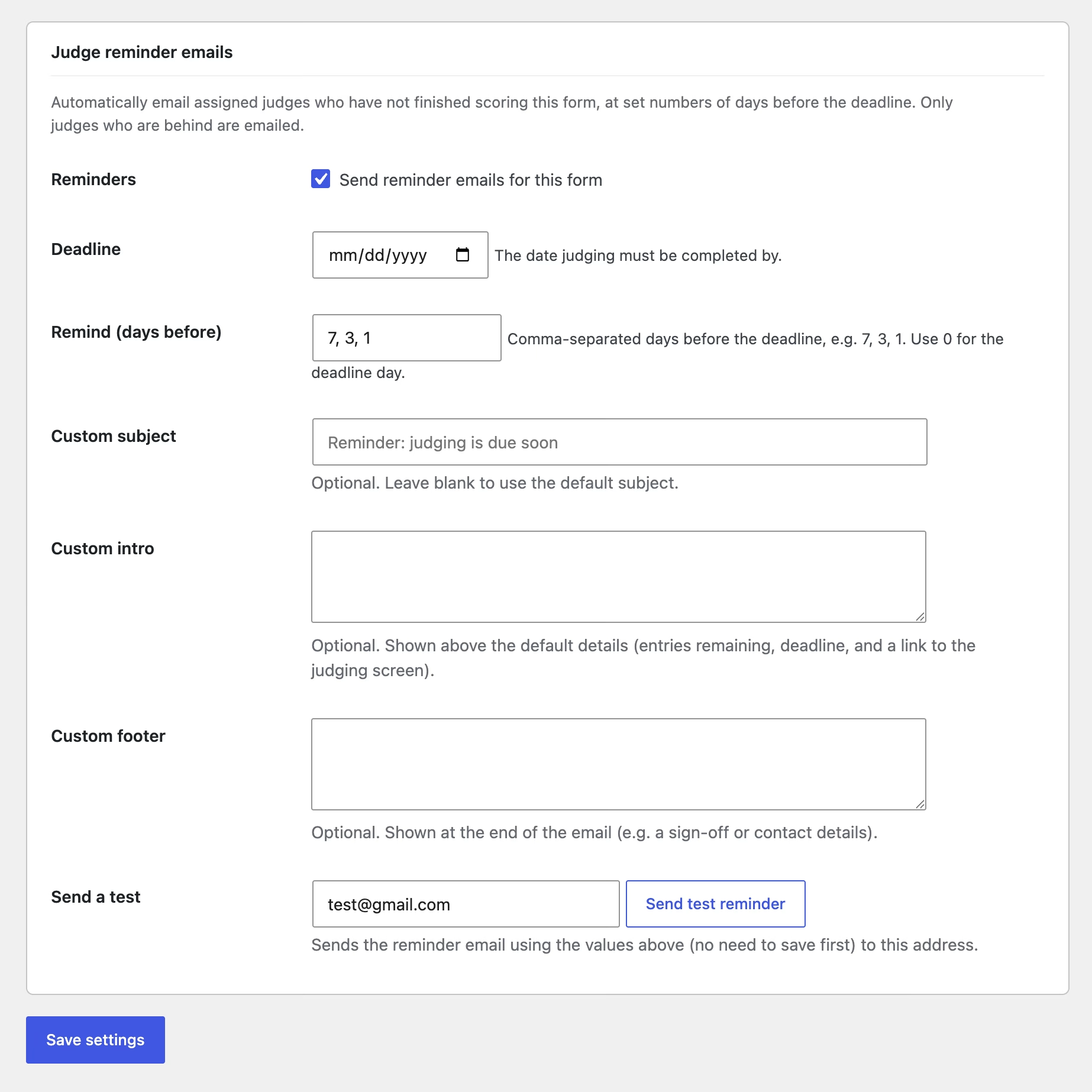
Set a deadline and the days-before to nudge. A daily task emails only the judges who are behind — with optional custom subject, intro, and footer.

Results Export PRO

Export a form's results as native CSV or XLSX — no third-party library. A clean matrix: Rank, Entry ID, Average, Judges scored, one column per judge, and Comments.

Comment AutosavePRO

Written feedback saves automatically on blur or a pause in typing — the same no-lost-work behavior as scores, extended to comments.

Priority Support PRO

Get fast, direct help from the developer. Pro licenses come with priority email support so setup questions and edge cases don't sit in a queue.

Free & Pro

Start free. Scale with Pro.

The free plugin is a complete judging tool. Pro is for teams running weighted rubrics, multiple forms, written feedback, and exportable results.

Free

Entry Judging for Gravity Forms

Blind, panel-based judging — free and fully functional.

Pro Start with a 14-day free trial, no credit card required

Entry Judging for Gravity Forms Pro

For larger contests, multi-form programs, and committees.

20% OFF WITH COUPON TAKE20

$39.99
$31.99

$69.99
$55.99

$129.99
$103.99

FAQ

Common questions

Yes. Entry Judging reads and scores Gravity Forms entries, so Gravity Forms must be installed and active. If it isn’t, the plugin stays inactive and shows a notice — your settings are never lost.

Name and Email field types are hidden from judges by default. In Judging → Settings you refine exactly which of the remaining fields judges see, so only the content that needs evaluating is shown.

Results are locked until every assigned judge has scored every entry. An administrator can override the lock to reveal results early, and can re-lock them at any time.

Each judge’s score for an entry is stored separately, keyed to their WordPress user account, so judges never overwrite one another. Scores autosave as they’re entered and are saved against the Gravity Forms entry.

Yes. Assigning a user as a judge grants access to the Judging screen only — not administrator access. Administrators always retain access.

By default, only currently-assigned judges’ scores count toward averages and rankings. An option lets you also include scores from administrators or from users who are no longer assigned.

Yes. Point a judging round at any existing form and its entries are ready to score — no re-collecting submissions, no data migration.

Everything lives under the Judging menu once Gravity Forms is active — Settings, Judges, and Results.

Ready to run a judging round your panel will trust?

Entry Judging works with the Gravity Forms form you already have. Install it from WordPress.org this afternoon, hide the identifying fields, add your judges, and open scoring — free, with nothing to configure around.

Contact Us Today

Name(Required)